Queries and commands
Reads use the Fleet API: the vehicle list, vehicle_data, and wake. Location on firmware 2023.38 and later needs the location_data endpoint and the vehicle_location scope. status and check do not request that endpoint. where requests it only when the vehicle list already says the car is online. Coordinates are not copied into the AI agent’s memory.
agentdrive status reads charge, climate, and vehicle state, including tyre pressures and TPMS warnings. If the vehicle list says the car is asleep, status sends one wake and then polls for up to 45 seconds. The VIN is masked. Tokens are not printed. When the account has more than one vehicle, set AGENTDRIVE_VIN to choose one. Otherwise the first vehicle on the account is used.
agentdrive check is the read-only health check for a schedule. It reads the vehicle list first and does not wake a sleeping car. If the car is not online, the command skips, prints that it skipped, and exits 0. That skip does not change which alerts are remembered. If the car is online it looks for a TPMS warning, a tyre below the configured bar threshold, a low battery that is not charging, sentry off while that same low battery is not charging, the car unlocked or open while parked, or a charge error. It exits 1 only when an alert is new. The printed alerts are those new ones. The same alert exits 0, and is not printed again, until it clears and later returns. A different new alert still exits 1 while an older one continues. --json prints a short object for the AI agent. On install, schedule agentdrive check --json every 30 minutes and notify only when the exit code is 1. AgentDrive does not run that job and does not install cron. The morning usage briefing stays the separate daily job at the report-schedule time. Thresholds come from --tyre-threshold, --battery-threshold, or the tyre_pressure_bar and low_battery_percent habits in the profile. The default tyre line is 2.5 bar and the default battery line is 30 percent. Sentry off uses that same battery line. The check does not request location. Remembered alert codes are stored in $AGENTDRIVE_HOME/check-alerts.json (or ~/.config/agentdrive/check-alerts.json). That file is alert codes only. Do not copy it into the git repo.
agentdrive where is a read-only coarse area. It reads the vehicle list first. If the car is asleep or offline, it skips with the same kind of message as check, does not wake the car, and exits 0. If the car is already online, it calls vehicle_data with endpoints=location_data only.
Before that point leaves the process, latitude and longitude are rounded to two decimal places, about 1 km. The command sends that rounded point to OpenStreetMap Nominatim for one reverse lookup at zoom 14, with the AgentDrive/<version> User-Agent. It does not retry, and it does not send the precise point. Nominatim’s usage policy allows this kind of light use and asks callers not to bulk-geocode. Place names are OpenStreetMap data.
The command prints a suburb or locality, a state or region, and a country. The text labels are suburb, region, and country. suburb is the suburb when Nominatim has one, and otherwise a neighbourhood, locality, village, town, or city. --json prints those three fields. Stdout, JSON, and errors do not contain coordinates. If the lookup fails, the command prints area unavailable and exits 1.
A location read needs the official vehicle_location scope. The owner sign-in scope list is openid, offline_access, user_data, vehicle_device_data, vehicle_location, and vehicle_cmds. If the token lacks vehicle_location, or the firmware refuses the read until that scope is granted, the command tells you to re-authorize and include vehicle_location, and it exits 1. Sign in again so the new token carries that scope. status and check stay free of location.
agentdrive report is the daily briefing. It uses that same parked snapshot (charge_state, climate_state, vehicle_state, and drive_state). It does not request location_data and it does not print coordinates. It does not call wake. If the vehicle list says the car is asleep, offline, or otherwise not online, it prints the same skip line as check and exits 0. A timeout or HTTP 408 is the same skip. When the car is online the briefing includes battery, charge connection, lock, gear, doors, windows, trunk, sentry, climate, tyres, and TPMS. --json prints the same briefing as an object. The AI agent sends that output every time. Exit 0 here is not a reason to stay quiet.
agentdrive report-schedule shows the daily time. The default is 07:30 local time and enabled, even when runtime.yaml has no report_schedule key. agentdrive report-schedule set HH:MM stores a 24-hour time. disable and enable store the on/off state. The file is $AGENTDRIVE_HOME/runtime.yaml (or ~/.config/agentdrive/runtime.yaml). Writing it does not change the AI agent’s job. After a change, the AI agent updates the job. The command also prints a crontab example, such as 30 7 * * * agentdrive history due. AgentDrive does not install that line and does not install a systemd timer.
agentdrive history reads the encrypted history file in the config home. history due is the morning usage briefing. On 1 January it covers the previous calendar year. On any other 1st it covers the previous calendar month. On Monday it covers the previous seven days, Monday through Sunday. Every other morning it covers the previous local day. Only one of those is sent. history daily, weekly, monthly, and yearly print that period when you ask. history trips, history charges, and history snapshots list the saved rows. --json prints the same facts as an object. These commands do not call the car.
A parked snapshot is saved when check or report already has a reading and the car is online. A check that finds nothing new to notify still saves that snapshot. Repeated checks that find the same parked condition update that snapshot’s last time, sample count, battery, and tyre readings. A new snapshot starts when the car leaves Park, charging changes, the lock, sentry, doors, windows, or trunk change, a new alert appears, or the odometer moves. Charge readings are kept with the charge session, about once a minute when a reading was seen. The database is encrypted with AES-256-GCM. The key is $AGENTDRIVE_HOME/history.key, created on first save, mode 600 on macOS and Linux. The Python dependency is cryptography. SQLCipher is not required. The key is not in the git repo and must not be pasted into chat.
What is saved: trip summaries (time, distance from the odometer change, battery, lock, gear, and sentry), charge sessions (time, start and end percent, energy added when the car sent it, and whether it was plugged in), those charge readings, parked snapshots, alerts when they appear, and software or unit settings when they change. A service you mention, such as a tyre rotation, is stored against the last saved odometer. How full the charge curve looks depends on how often the usual check runs while the car is already online or charging. AgentDrive does not run in the background to fill the gaps.
agentdrive news prints one new official item from https://www.tesla.com for the profile country, or for the computer’s timezone when the profile has no country. The Monday weekly briefing includes that same item: a short summary and the official link. A safety notice is preferred. The same item is not shown again for two calendar months. When there is nothing new, the command prints nothing and the briefing leaves that part out. It does not wake the car.
agentdrive tips says whether one short tip is included this morning. Tips are shown on Monday, Wednesday, Friday, and the 1st. The same tip is not shown again for two calendar months. A usage tip is not a stand-in for an empty official check. agentdrive service shows kilometres since a logged tyre rotation, tyre replacement, or other service. service log rotation, service log replacement, and service log maintenance record that event against the latest saved odometer. Tyre service uses 10,000 km (6,250 miles) unless you set --interval-km. Replacing tyres depends on tread. A --note can name the service, such as a cabin filter. A due reminder is added to the morning briefing, and that same reminder waits two calendar months before it is sent again. tips, news, and service do not wake the car.
Commands:
| Command | What it sends | Confirmation |
|---|---|---|
where |
no signed command; one location_data read when the car is already online |
no |
wake |
signed wake |
no, and it does not use the park check |
flash |
signed flash-lights |
no |
honk |
signed honk |
no |
lock |
signed lock |
no |
unlock |
signed unlock |
yes, one time |
climate-on, climate-off |
signed climate command | no |
set-temp <C> |
signed climate-set-temp |
no, and only 15 to 28 C |
sentry-on |
signed sentry-mode on |
no |
sentry-off |
signed sentry-mode off |
yes, one time |
seat-heat <seat> <level> |
signed seat-heater |
no |
steering-heat on or off |
signed steering-wheel-heater |
no |
defrost-on, defrost-off |
signed preconditioning-max |
no |
precondition |
signed climate-on |
no |
charge-start, charge-stop |
signed charging command | yes, one time |
charge-limit <percent> |
signed charging-set-limit |
yes, one time, and only 50 to 100 |
charge-schedule show |
read charge_schedule_data |
no, and it does not wake |
charge-schedule set <days> <time> <latitude> <longitude> |
signed charging-schedule-add |
yes, one time |
charge-schedule remove <id> |
signed charging-schedule-remove |
yes, one time |
trunk-open |
signed trunk-open |
yes, one time. The sentence names open rear trunk |
trunk-close |
signed trunk-close |
yes, one time. The sentence names close rear trunk |
frunk-open |
signed frunk-open |
yes, one time. The sentence names open frunk |
remote-start |
signed drive |
yes, one time. The sentence names enable remote start |
history trips, history charges, history snapshots |
no signed command; saved history only | no, and it does not contact the car |
history due, history daily, history weekly, history monthly, history yearly |
no signed command; saved history only | no |
tips |
no signed command | no, and it does not contact the car |
news |
no signed command; reads the official Tesla site for the owner’s country | no, and it does not wake the car |
service, service log rotation, service log replacement, service log maintenance |
no signed command; uses the saved odometer | no, and it does not wake the car |
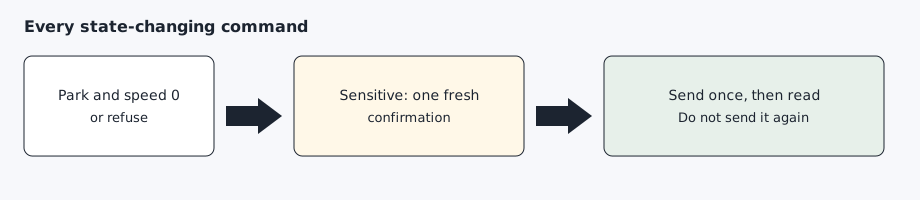
Unlock, turning sentry off, every charging change, the rear trunk, the front trunk, and remote start go through the existing confirmation layer. A schedule cannot confirm them and cannot run sentry off, the trunk, the front trunk, or remote start. The health check stays agentdrive check. The morning job stays agentdrive history due. State-changing commands are sent only in Park at speed 0, then read back once.
Sentry and cabin climate
sentry-on and sentry-off wake a sleeping car. If the vehicle list says the car is not online, they send one wake and poll for up to 45 seconds, then send the signed sentry-mode command. check, report, where, and history do not wake a sleeping car. Seat heat, steering-wheel heat, defrost, and precondition wake a sleeping car the same way the other parked commands do.
sentry-off needs a confirmation sentence that includes confirm and the action, for example I confirm turn sentry off. A scheduled job cannot supply that sentence and cannot run sentry-off. sentry-on does not add a confirmation.
agentdrive sentry-on
agentdrive sentry-off --confirm "I confirm turn sentry off"
agentdrive seat-heat front-left medium
agentdrive steering-heat on
agentdrive defrost-on
agentdrive defrost-off
agentdrive precondition
seat-heat sends seat-heater. The seat is front-left, front-right, 2nd-row-left, 2nd-row-center, 2nd-row-right, 3rd-row-left, or 3rd-row-right. The level is off, low, medium, or high. A backrest heater, a center seat the tool does not name, and a numeric level are refused before the command is sent.
steering-heat sends steering-wheel-heater with on or off. A heat level is refused, because that signed command has no level.
defrost-on and defrost-off send preconditioning-max. That is max defrost for the front and rear together. There is no separate front-only or rear-only command, and the manual override is not sent. Upstream tesla-control does not include that subcommand, so the installer adds it to the local build. agentdrive update rebuilds that binary.
precondition sends climate-on, which starts cabin preconditioning now. It does not add a precondition schedule or a scheduled departure. climate-off stops the cabin climate.
Rear trunk, front trunk, and remote start
agentdrive trunk-open --confirm "I confirm open rear trunk"
agentdrive trunk-close --confirm "I confirm close rear trunk"
agentdrive frunk-open --confirm "I confirm open frunk"
agentdrive remote-start --confirm "I confirm enable remote start"
trunk-open opens the rear trunk. trunk-close closes it when the vehicle can close the rear trunk electrically. If the car cannot, the signed command fails once and is not sent again. After a successful open, the follow-up read must show the rear trunk open. After a successful close, it must show the rear trunk closed.
frunk-open opens the front trunk. The front trunk cannot be closed from AgentDrive. The signed command tool has no close for it.
remote-start enables keyless driving for a short time, so the car can be driven without the phone key. It does not drive the car, it does not start an engine, and it does not ask for an account password. The signed command is drive. The follow-up read checks that the car is still in Park at speed 0.
These four commands may wake a sleeping car, the same way lock, climate, and charging commands do. agentdrive check, agentdrive report, agentdrive where, and agentdrive history still never wake a sleeping car.
In-car charging timetable
charge-schedule reads and changes the timetable stored on the car. It is not a reminder on this computer, and it does not call charge-start later.
agentdrive charge-schedule show
agentdrive charge-schedule show --json
agentdrive charge-schedule set weekdays 22:00-06:00 1 2 --confirm "I confirm charging schedule set"
agentdrive charge-schedule set all 23:30- --once --confirm "I confirm charging schedule set"
agentdrive charge-schedule set Mon,Wed -06:00 1 2 --enabled false --confirm "I confirm charging schedule set"
agentdrive charge-schedule remove 1700000000 --confirm "I confirm charging schedule remove"
show calls vehicle_data with the endpoint charge_schedule_data. If the vehicle list says the car is asleep, offline, or otherwise not online, the command skips, prints that it skipped, and exits 0. It does not send a wake. --json prints state, skipped, and schedules.
set and remove are charging changes. Each one needs a confirmation sentence that includes confirm and the action name (charging schedule set or charging schedule remove). A scheduled job cannot supply that sentence. If the vehicle list says the car is not online, these two commands wake it, the same way the other parked commands do. The car must then be in Park at speed 0. The command is sent once, then the timetable is read again.
| Argument | Value |
|---|---|
days |
all, weekdays, or a comma-separated list of Sun, Mon, Tues, Wed, Thurs, Fri, Sat. Sunday, Monday, Tuesday, Wednesday, Thursday, Friday, and Saturday are accepted. |
time |
24-hour local time. 22:00-06:00 sets a start and an end. 22:00- sets a start. -06:00 sets an end. These are minutes after midnight. The end may fall on the next day. |
latitude longitude |
Charging-site coordinates in decimal degrees, from -180 to 180. The signed command requires both. |
--once |
The row runs once. Omit it and the row repeats every week. |
--enabled |
true (the default) or false. false adds the row turned off. |
ID |
The id printed by show. remove deletes that row. |
show prints each row’s id, enabled flag, days, start, end, weekly or once, charging-site coordinates, and name when the response includes one. The read asks only for charge_schedule_data. It does not ask for location_data.
set signs charging-schedule-add, which is add_charge_schedule. remove signs charging-schedule-remove with type id, which is remove_charge_schedule. Tesla’s command reference says set_scheduled_charging is not recommended beginning with firmware version 2024.26, and that add_charge_schedule should be used instead. The older command takes one time in minutes after midnight. This command family sends add_charge_schedule, which carries the days, a start, an end, or both, the charging-site coordinates, one_time, and enabled.
set adds a row. In the current tesla-control charging-schedule-add command, the optional id argument is not copied into the signed message. The tool stores the current unix time as the id. There is no update-by-id flag here. --enabled false adds a disabled row. It leaves rows that are already on the car as they are. remove is how you drop an id. One set is one window. Different hours on different days are separate schedules. Preconditioning and scheduled departure are separate commands and are not part of charge-schedule. Immediate cabin preconditioning is agentdrive precondition.
The sample coordinates and the sample id above are placeholders.
Signed commands run tesla-control with TESLA_TOKEN_FILE, TESLA_KEY_FILE, and TESLA_VIN set in the environment. Those names are what the tool requires. The access token is written to a mode 0600 file and deleted in a finally block. It is never placed on the argument list. The tool is invoked once. If it fails, it is not launched again until a read shows whether the car already changed.
agentdrive update fast-forwards the checkout from main, or downloads that branch when the tree is not a git checkout, then re-runs the install steps. It does not modify tokens, keys, client credentials, host.yaml, or vehicle files under $AGENTDRIVE_HOME.
agentdrive check
agentdrive report
agentdrive report-schedule
agentdrive report-schedule set 07:30
agentdrive report-schedule disable
agentdrive report-schedule enable
agentdrive where
agentdrive charge-schedule show
agentdrive update
agentdrive status does not request location. The client refuses the business-only charging sessions route. Nearby charging reads keep location and stall counts.
Expected result
A status question returns a short readout with tyre pressures, no coordinates, and a masked VIN. agentdrive where returns a suburb, region, and country, or says that it skipped when the car is asleep. A parked lights flash runs once and is followed by another read. A sleeping car makes agentdrive check, agentdrive report, agentdrive where, and agentdrive charge-schedule show exit 0 without a wake. The AI agent still sends the report, including that skip line.
Illustrative sample. These figures are sample data, not a vehicle reading:
Vehicle report: Example
Battery: 80% | Range: 161 km | Limit: 80%
Charge connection: Disconnected
Locked: yes
Gear: P (parked)
Doors, windows, and trunk: closed
Sentry: on
Climate: off (set 21.0°C)
Inside: 20.0°C | Outside: 15.0°C
Tyres (bar): FL 2.9 FR 2.9 RL 2.9 RR 2.9
TPMS: ok